Showing posts with label WordPress. Show all posts
Best WordPress Live Chat Plugins Compared for 2019

Best WordPress Live Chat Plugins Compared for 2019

Here you will find a collection of the Best WordPress Live Chat Plugins. I have listed some PHP live chat plugins, as well as software that can be integrated with any 

Most of the content on

This is good in a unique entertainment base, but sometimes people have questions that can not be answered, sometimes the content is not self-explanatory, and sometimes the users want the questions answered one by one.

For example, 68% of all customers do not make a purchase, and most of this happens because they have questions or doubts about the products or services. To eliminate such problems, you can install the functions of a live chat on Buy Now

It also adds a level of personal touch to your website or blog.

You can offer exceptional customer service, much better and more attractive than typical e-mail support. In addition, you can also address your problems instantly, which is always an advantage for your customers since no one likes to wait.
Again, as discussed, many people leave an electronic store because of the ambiguity of the content. And in this way with the functionality of a live chat. You can address these potential customers, resolve their doubts, queries, and increase conversions.
If you are here, it is because you are an active user of WordPress. And you will be pleased to know that the platform is full of very good plugins that allow you to chat with your clients one by one.
In fact, there are so many add-ons in this category that you can even get confused about which one is the best and which one suits your needs. But I will give a detailed explanation of each one so that the election is the most appropriate.
In this post, I have compiled a list of the best WordPress plugins for a Live Chat separating wheat chaff. So without further ado, let’s see this list:

Top Premium WordPress Live Chat Plugins

Facebook Chat for WordPress
Facebook Chat for WordPress - WordPress Live Chat Plugins
The name of the plugin says it all. With this add-on, you can incorporate Facebook’s live chat features into your WordPress website and make it more attractive for your visitors to see. Best WordPress Live Chat Plugins Compared
How to Change WordPress Password PhpMyAdmin

How to Change WordPress Password PhpMyAdmin

If you have inherited a website developed in WordPress by another Webmaster and you do not know the access credentials. Or you have just lost your password and the mail does not arrive to retrieve it. I will explain a method to change WordPress password by PhpMyAdmin MySQL.
All you need is access to the control panel of the accommodation (cPanel, Plesk or whatever).
I will describe how to access phpMyAdmin and from the corresponding table change wp-admin password. If you are not in the habit of entering the database and making changes directly on it, you may feel a bit intimidated. Do not be afraid, I will go step by step and it will be much simpler than you think.

Change WordPress Password by PhpMyAdmin

The steps you must follow are the following:
1) Access the hosting control panel.
2) First of all, make a backup of the entire web. If something goes wrong you can always use it to restore the changes. In this other tutorial, I explain how to do it step by step from cPanel.
3) When you have your backup in a safe place, go to Files → File Manager and / public_html (or the WordPress installation folder) and locate the file wp-config.php. eye! sometimes this file is not in the same directory as the WordPress installation but at a higher level. However you should locate that file. You can also do this step from an FTP client program.
4) Once located, open it and write down the name of the database of your web page. This step is important because it is possible that there are several databases in use in the hosting. There may even be several WordPress installations active each with its own database. Imagine that you do all the steps correctly but on a database that is not your own page, the crap can be capitalized.
5) From the hosting panel access to the phpMyAdmin database manager. In cPanel is located in Databases → phpMyAdmin.
6) Once inside phpMyAdmin it loads the database in use, its name you noted in step 4. Remember that all the databases that are in use appear in the left column.
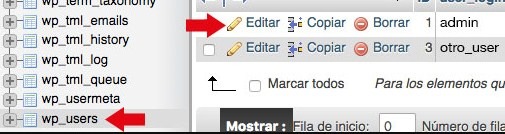
7) Locate the wp_users table. It is possible that the prefix of the table is not wp_ but any other. Many developers, including myself, change the prefix of the tables as a security measure. In any case the structure of the same will always be miprefijo_users.
change wordpress password in phpmyadmin
8) If there is more than one user, enter the row that corresponds to one with the administrator role by clicking "Edit".
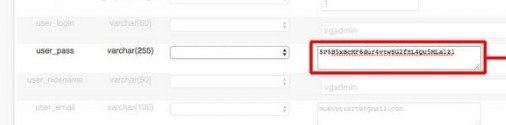
9) The row that you have to modify is user_pass. However, the password must be encrypted in MD5. And what is MD5? MD5 stands for "Message Digest Algorithm 5" which is an algorithm used, among other things, to encode passwords in databases. An MD5 hash is composed of 32 hexadecimal characters. To convert your password to MD5 follow these steps:
  • Enter this web page, and put in the field assigned to it the password you want to encrypt.
  • Click on the "Encrypt" button
  • Just below the button appears a text that says: "MD5 hash for your_password is: 29698e0e8f212adfc62465d1e0c8789b"
10) Copy everything after the colon as it is your password encrypted in MD5.
11) Go back to your database and to the user_pass row. In the "Value" field there is the old password. Delete it and paste the text that you just copied.
user pass change by phpmyadmin
12) Click "Continue" to apply the changes.
13) Verify that the changes you have made work by entering http://wpmethods.com/wp-admin.

Well, this is all, simple right? If you have followed this step-by-step mini-tutorial, you must have Change WordPress Password without any problems.  How to Change WordPress Password PhpMyAdmin

Best Free WordPress Themes and Fully Responsive

Best Free WordPress Themes and Fully Responsive

We want to share with you a list of the best WordPress themes for free and adapted to mobile devices. WordPress is today the best platform for websites that require blogs or share content on the Internet. It has a large number of options and plugins.
Best Free WordPress Themes and Fully ResponsiveSure you've heard comments like free WordPress themes are a risk. Because they do not offer any support or are design by normal developers. In many cases, this may be true, so it is important to make sure that the template you choose for your WordPress website has a quality design and has acceptable support. Unlike, WordPress premium templates generally offer a solid coding, constant support by the development team in case you encounter a problem and a large number of features. And functionalities that in many cases greatly outweigh the reasonable investment to be made.
However, there are some really interesting free WordPress themes, both in their design and in the functionalities they bring and that in some cases exceed some payment templates. In this article, we present a collection of wonderful free WordPress themes. Ideal for amateurs, bloggers, personal sites, portfolios and companies that want to save some money to devote to other activities. Read More
Best Free WordPress eCommerce Themes for Dropshipping Businesses

Best Free WordPress eCommerce Themes for Dropshipping Businesses

If you want to start Dropshipping Business then this article only for you. In this article, I will show you the best free WordPress eCommerce themes for your Dropshipping business. This article helps you to choose the best WooCommerce theme for dropshipping. And you can make a dropshipping website with WordPress CMS, a powerful CMS ( Content Management System) along with WooCommerce which makes setting up your online business a piece of cake.

WHAT IS DROPSHIPPING?

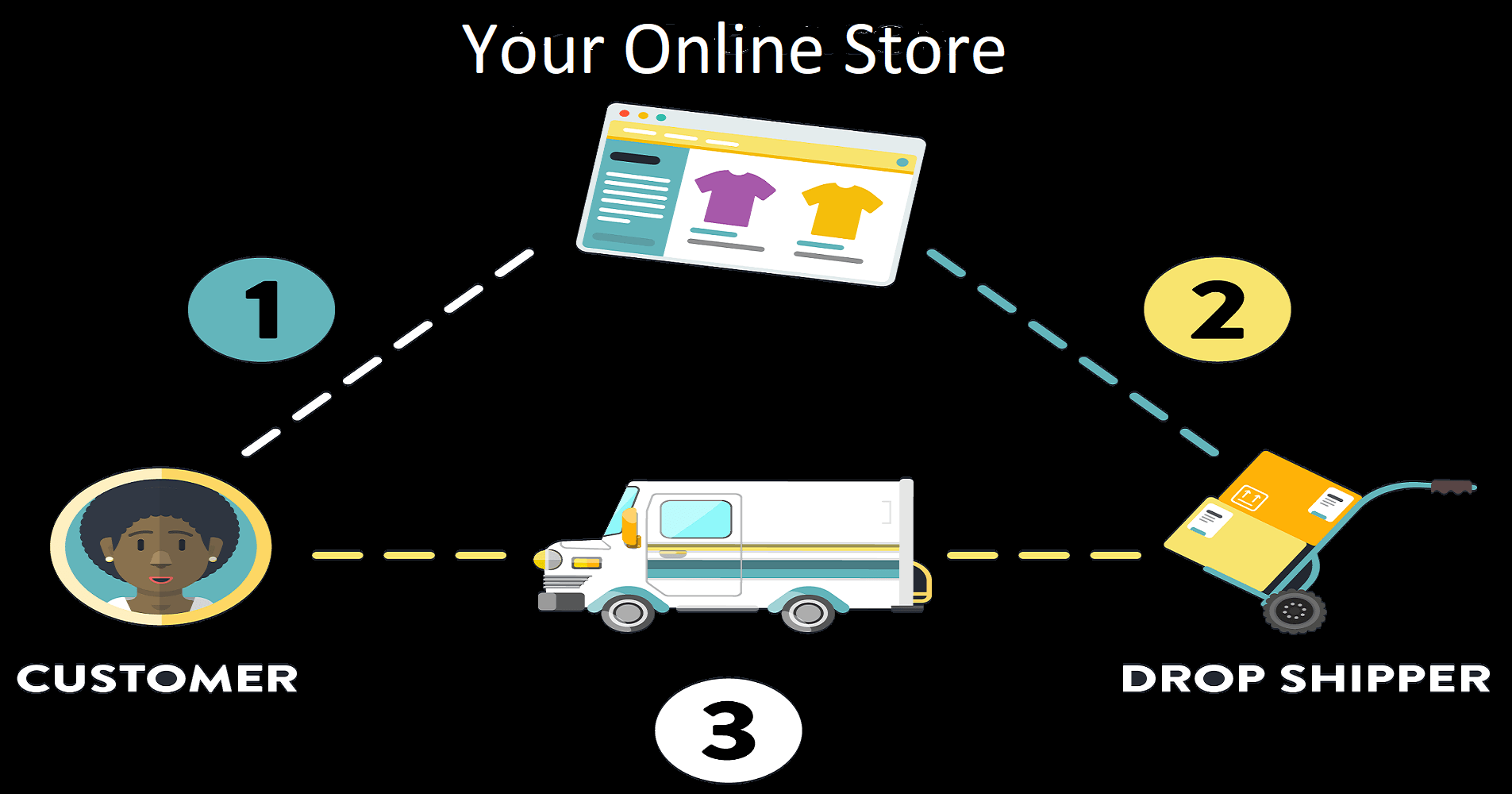
what is dropshipping online business wpmethods
Dropshipping is the type of business model you don’t have any owning a warehouse to store their products, maintaining inventory, or even having to ship their products to their customers themselves. Dropshipping business works retailer partners up with a dropship supplier that manufactures or warehouses products, ships them directly to the retailer’s customer, and packages the products, on the retailer’s behalf.

In simpler methods, this is how dropshipping works:

  1. A customer places an order for a product on your online store.
  2. You can automatically or manually forwards the order details to your dropship supplier.
  3. And the dropship supplier packages and ships the order directly to the customer in your store name.
Now, let’s get started with some of the best free WordPress eCommerce themes for dropshipping business. Best Free WordPress eCommerce Themes for Dropshipping Businesses
নিয়ে নিন Camtasia 9 Video Studio Full Version with Crack File একদম ফ্রিতে। খুব সহজে।

নিয়ে নিন Camtasia 9 Video Studio Full Version with Crack File একদম ফ্রিতে। খুব সহজে।

আসসালামুয়ালাইকুম!
সবাই কেমন আছেন আশা করি ভালো আছেন। আমিও আল্লাহর রহমতে আপনাদের দোয়ায় ভালো আছি। আমি মোঃ রাশেদ Tech Jan থেকে।
আমার এই পোস্টটি আমি আগেও অন্য জায়গায় পোস্ট করছিলাম। এটা আমার সম্পূর্ণ নতুন সাইট তাই এখানে আবার করলাম পোস্টটি। আশা করি আমার সাথেই থাকবেন।

আগেই আমি বলে রাখি আমি নিজেও এই পদ্ধতিতে Camtasia 9 ব্যবহার করি। আর আলতু পালতু পোস্ট করে মানুষকে বিভ্রান্তিতে ফেলা আমার নিতির মধ্য পড়ে না। যাই করি নিজে আগে পরিক্ষা করে দেখি তারপর সবার কাছে শেয়ার করি। 


যাই হোক কথা বাড়িয়ে লাভ নেই। কাজ শুরু করা যাক।
আমরা যে camtasia 9 ডাউনলোড করি কিন্তু দেখি তারা ৩০ দিনের জন্য Trial Version দেয়। এবং সেটা দিয়ে Edit করতে অনেক রকম সমস্যা দেয়।

আমি একখন যে পদ্ধতিটা দেখাবো সে পদ্ধতিতে আপনি camtasia 9 আজীবনের জন্য ফ্রি ব্যবহার করতে পারবেন।

প্রথমে এই লিঙ্ক থেকে Camtasia 9 ডাউনলোড ফাইলটি নামিয়ে নিন ইন্সটল করে নিন।
তারপর ক্র্যাক ফাইলটি ডাউনলোড করে নিন নিচের স্কিন-শর্ট এর মত করে।
Active File টি ডাউনলোড করে নিন।


ফাইলটিকে Extract করার আগে অবশ্যই আপনার কম্পিউটার এর Antivirus টি বন্দ করে রাখবেন। ভয়ের কোন কারন নেই আপনার কম্পিউটার হ্যাক হবে না। এটা শুধু করা আপনার Antivirus ফাইলটিকে ভাইরাস ভেবে যেন কেটে ফেলতে না পারে সে জন্য।
ফাইলটিকে Extract করুন।
তারপর ফাইলটিকে ইন্সটল করুন।
রাডিও বাটনটাকে আনটিক করুন বা টিন চিনহ উঠিয়ে দিন।
এখানে English Language দিন।
তারপর ইন্সটলে ক্লিক করুন।


ইন্সট্রল হওয়ার পর Finish করুন।
তারপর Camtasia 9 ওপেন করুন। আর দেখুন মজা।
বিশ্বাস না হলে আমার পিসির কিছু screenshot দেখুন।


কোন সমস্যা হলে কমেন্ট করতে ভূলবেন না। আমি আছি আপনাদের সাথে। 
তো আর কি আমার জন্য দোয়া করুন সবাই ভালো থাকবেন।
আমার সাথেই থাকবেন। এবং আমার ব্লগটি ভিজিট করবেন। আল্লাহ হাফেজ।ধন্যবাদ। https://wpmethods.com
Flimora Video Editor  Download+Crack File-How to Crack Flimora Video Editor and Download Crack File

Flimora Video Editor Download+Crack File-How to Crack Flimora Video Editor and Download Crack File

বর্তমানের ভিডিও এডিটের জন্য সেরা সফটওয়্যার হচ্ছে Camtasia  9। কিন্তু দুর্ভাগ্য বসত এটি নরমাল কোন পিসিতে সাপোর্ট করে না। 64 bit ছাড়াতো ছলেই না। 32bit দিয়ে হতো অনেকে টিউটোরিয়াল করে কিন্তু সেগুলোও ভালো কাজ করে না বা সকল সুবিধা পাওয়া যায় না।

তো এমন অবস্থায় আমরা খুব জামেলার মধ্য পড়ে যাই। আমরা হয়তো অনেকে আছি যারা ইউটিউব এর জন্য ভিডিও বানাই বা অন্যন্য কাজের জন্য একটা ভালো মানের ভিডিও এডিটর দরকার হয়। কিন্তু ভালো মানের গুলোতো আবার নরমাল কোন পিসিতে সাপোট করে না।
তো আমি এখন এমন একটি সফটওয়্যার এর সাথে আপনাকে পরিচয় করিয়ে দেবো সেটি দিয়ে আপনি নরমাল বা 32 bit Windows দিয়েও ভালো কাজ করতে পারেন। এতে আমার জানা মতে Graphics Card এর জন্যও কোন সমসস্যা হবে না বা কাজ করেও অনেক মজা পাবেন। ব্যবহার করাও খুব সহজ। কারণ আমি নিজেও ব্যবহার করচিলাম আমার ১০ বছর আগের পিসিতে :p । 

আজকে আমি দেখাবো কিভাবে এটি আপনি Download করাবেন। 

তো প্রথমে এই লিঙ্ক থেকে ডাউনলোড করে নিন Flimora Download file.rar শুধু 
ডাউনলোড করার পর ফাইলটিকে Winrar বা Unziper দিয়ে Extract করুন। 


সফটওয়্যারটি Install করার আগে Block host ফাইলটি Run করেন নিন। Antivirus Problem করলে Stop করে রাখুন কিছুক্ষনের জন্য। 


তারপর Filmora সফটওয়্যারটি Install করুন। 


Install হয়ে যাওয়ার পর ওপেন করুন। 

তারপর FULL FEATURE MODE এ ডুকুন। 


তারপর উপরে এরকম একটি REGISTER বাটন দেখতে পাবেন। সেটায় ক্লিক করুন। 


খালি box দুটো দেখতে পাবেন। প্রথম Box এ যেকোন Email ID দিন।
এবং 2nd Box এখান থেকে যেকোন একটি সিরিয়াল-কি দিন। তারপর ওকে দিন কাজ শেষ।


তো সবাই ভালো থাকবেন, নিত্যনতুন পোস্ট পেতে আমাদের সাথেই থাকুন।
ভালো লাগলে শেয়ার করুন। কোন সমস্যা হলে কমেন্ট করুন। আল্লাহ হাফেজ।